Insights Capture vs OBS Studio: The OBS Alternative for Game Clipping (2026)

OBS is the best free streaming software ever made — and most gamers who only want clips never needed it. Here's the honest comparison: where OBS is irreplaceable, and when a purpose-built game recorder is simply the better option.
Looking for an OBS alternative for recording gameplay? Here is the honest answer up front: OBS Studio is the best free live streaming software ever made, and most gamers who only want clips never needed it. OBS is built for live streaming and multi camera production; Insights Capture is built for one job — recording your matches automatically and turning them into clips. This comparison covers what each tool does well, where OBS is genuinely irreplaceable, and when a purpose-built game recorder is simply the better OBS alternative.
What Is the Best OBS Alternative?
The best OBS alternative depends on the job. For automatic gameplay recording and clipping, Insights Capture is the strongest free OBS alternative — it records every match with no setup, marks highlights, and clips in two clicks. For live streaming, Streamlabs and XSplit are the closest substitutes. For quick screen recording of tutorials or training videos, lightweight tools like Bandicam or the built-in Xbox Game Bar do the job. There is no single tool that replaces everything OBS does — which is exactly why picking by use case beats picking by feature count.
The Quick Verdict
- Choose OBS Studio if you stream to Twitch or YouTube, need scene transitions, overlays, audio routing, media playback, or a multi camera production system — nothing free touches it for live production.
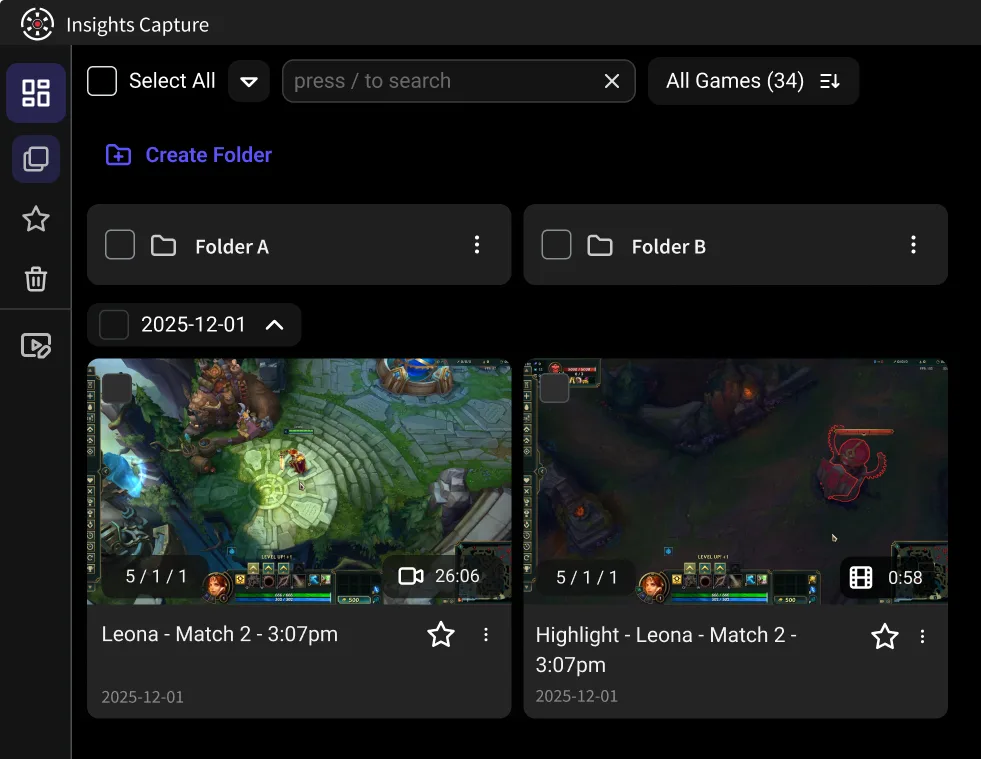
- Choose Insights Capture if you record games to clip and review them. It captures every match automatically, marks kills and wins on a timeline, clips in two clicks, and needs no setup at all.
- Plenty of players run both: OBS for the live streaming, Insights Capture in the background so highlights are already marked when the stream ends.
Why Gamers Look for an OBS Alternative
OBS Studio is completely free, open source, and endlessly capable — but that capability is exactly the problem for a player who just wants their best moments saved. The most common reasons people search for the best OBS alternatives:
- Setup complexity. Scenes, sources, encoder settings, audio levels, bitrates — the steep learning curve is real, and a misconfigured encoder means dropped frames you discover after the match.
- Everything is manual. OBS records when you tell it to. There is no game detection, no highlight detection, and the replay buffer only saves a moment if you remembered to press the hotkey.
- No built in editor. OBS produces a video file; video editing, clipping and sharing happen in a separate editor.
- It's built for streamers first. Most of what makes OBS powerful — scene layouts, scene transitions, built in alerts, chat widgets, the large plugin ecosystem — is production features a non-streamer never touches.
None of that is criticism OBS's active community would dispute; it is streaming software being used as a screen recording tool.
Key Features to Compare in an OBS Alternative
- Screen recording vs game capture. General screen recording tools capture anything on the display; game recorders detect the game and optimize for it.
- Live streaming. If you broadcast, this is non-negotiable — and it rules out clip-focused tools immediately.
- Automatic capture and highlights. The feature OBS lacks entirely, and the one that saves the most time for players.
- Built in editing tools. Trimming and sharing inside the app versus exporting to separate video editing software.
- Platform compatibility. OBS runs on Windows, Mac and Linux; most game recorders (Insights Capture included) are Windows-first.
- Free plan vs paid tiers. OBS is completely free forever. Many OBS alternatives offer a free version with premium features behind paid plans — check what the free tier actually includes (Insights Capture's free plan has no watermark).
Insights Capture vs OBS Studio: Feature by Feature
Price. Both are free. OBS is open source with community forums; Insights Capture is a free OBS alternative with no watermark and paid tiers only for extras like more cloud storage.
Setup. OBS: install, create scenes, add a game capture source, pick an encoder, test your recording. Insights Capture: install and play — it detects the game and starts recording on its own.
Recording. OBS records exactly what you configure, at whatever quality your encoder settings allow. Insights Capture records every match automatically with GPU-accelerated encoding and no meaningful FPS cost.
Clipping. In OBS you enable the replay buffer, bind a hotkey, and press it in the moment — then find and cut the file later. In Insights Capture the whole match is recorded and key moments are already marked, so you clip after the game in two clicks. No hotkey reflexes required.
Editing and sharing. OBS has none built in. Insights Capture includes a built in editor for trimming and merging, plus share links that post straight to Discord or social platforms.
Review. The biggest gap: Insights.gg includes a VOD review workspace where you and teammates leave timestamped comments and drawings on a recording. OBS has nothing comparable — it was never meant to.
Live streaming. OBS wins outright. Insights Capture does not stream, and if streaming is your main use case you should not replace OBS at all.
What About the Other OBS Alternatives?
Most “best OBS alternatives” lists mix streaming tools and screen recording tools. A quick map of where the popular picks fit:
- Streamlabs and XSplit are OBS with a friendlier face — still live streaming software, with paid tools for premium features.
- Meld Studio is the newer drag-and-drop streaming tool earning attention from creators who find OBS heavy.
- Bandicam and Action are classic screen recording programs for high-FPS capture: good quality, but manual, with only basic editing and no game-event detection.
- NVIDIA ShadowPlay is the lightweight replay buffer for GeForce owners — see our full Insights Capture vs ShadowPlay comparison.
- Xbox Game Bar is the zero-install built-in option — compared in Insights Capture vs Xbox Game Bar.
- Medal and Outplayed are the closest to Insights Capture in spirit — auto-clipping tools. We compare them in Insights vs Medal and Insights Capture vs Outplayed.
More OBS Alternatives by Use Case
- Streamlabs Desktop is built on OBS with a cleaner interface, themed overlays and alert widgets for Twitch and YouTube streamers. It has no built-in video editor.
- XSplit Broadcaster has a polished interface and professional features used in esports broadcasts, including 4K streaming without plugins.
- Meld Studio uses a drag-and-drop scene builder with built-in effects and overlays, so no plugins are needed.
- vMix and Wirecast handle professional multi-camera production for live events.
- Switcher Studio turns iPhones and iPads into a multi-camera system.
- Lightstream streams from consoles in the cloud, with overlays and alerts and no heavy load on your own hardware.
- StreamYard streams and records from the browser with nothing to install.
- Ecamm Live is live production software built for macOS.
- Camtasia combines screen recording and editing in one app, which suits tutorials and training videos.
- ScreenPal makes quick cloud recordings with basic editing tools for sharing.
- Riverside records each participant locally, for podcasts and remote interviews.
- Bandicam records high-FPS gameplay with a light system load.
- Medal captures gameplay highlights and shares them to social platforms.
For a full ranked list, see our 10 best game clipping software guide.
When OBS Is Still the Right Pick
Honesty matters in a comparison written by one of the tools: if you do any live streaming, produce tutorial or training videos with multiple audio sources, capture from cameras or capture cards, need multi camera switching, or want total control over encoder settings and output formats, use OBS Studio. It is completely free, the plugin ecosystem is enormous, and the active community has solved every problem you will ever hit.
When Insights Capture Is the Better OBS Alternative
- Nothing to configure — game capture starts when your match does.
- Highlights find themselves — kills, wins and key events are marked on a timeline across 10,000+ games.
- Clip after the fact — no replay buffer hotkey, no lost moments.
- Built in editing tools — trim, merge and share without a separate editor.
- Team review — timestamped comments and drawing tools your squad can use on the same VOD.
Download Insights Capture free — it takes about five minutes to be fully set up, which is roughly the time OBS needs to create your first scene.
{{button}}
FAQs: OBS Alternatives
1. Is there a better recorder than OBS?
For live streaming, no free tool is better. For screen recording gameplay specifically, purpose-built recorders like Insights Capture are easier and catch moments OBS's replay buffer misses.
2. What are some free alternatives to OBS Studio?
Insights Capture (automatic game recording), Xbox Game Bar (built into Windows), NVIDIA ShadowPlay (GeForce GPUs), and ShareX (general screen capture) are all free OBS alternatives — each covering a different slice of what OBS does.
3. Should I turn the replay buffer on in OBS?
If you use OBS for clips, yes — it is the only way to save a moment retroactively. Set it to 60–120 seconds and bind a hotkey you will actually remember mid-game.
4. Does Insights Capture affect FPS?
No meaningful impact — it uses GPU-accelerated encoding (NVENC/AMD), the same approach that makes OBS efficient when configured correctly, minus the configuring.
5. Can I run OBS and Insights Capture at the same time?
Yes. Streamers commonly run OBS for the broadcast and Insights Capture for automatic highlights — they do not conflict.
6. Is OBS shutting down?
No. OBS Studio is actively developed and remains the standard for free live streaming software.
Final Thoughts
OBS Studio and Insights Capture are not really competitors — one is a production studio, the other is a game recorder that thinks for you. Pick OBS for the stream. Pick Insights Capture for the clips. Run both if you are a creator, and stop losing highlights to a hotkey you forgot to press. Contact us with questions.