Insights Capture vs Eklipse: The Eklipse Alternative That Records Everything (2026)

Eklipse scans your finished stream VODs for AI highlights; Insights Capture records every match as you play — streamed or not. Opposite approaches to the same goal, compared honestly, including the setup that uses both.
Eklipse and Insights Capture both promise the same outcome — your best gaming moments turned into highlight clips without hours of manual editing — but they get there from opposite directions. Eklipse is a cloud AI that scans your finished stream VODs and cuts AI highlights for TikTok, YouTube Shorts and Instagram Reels. Insights Capture is a desktop game recorder that captures every match as you play and marks the highlights in real time — no stream required. Which one is the best Eklipse alternative (or whether you even need one) depends entirely on whether you're a streamer repurposing broadcasts or a player capturing gameplay.
What Is the Best Eklipse Alternative?
For most players, the best Eklipse alternative is a tool that captures gameplay at the source instead of scanning it afterward: Insights Capture records every match locally with game specific AI highlight detection across 10,000+ titles, free with no watermark. For streamers who specifically want vertical clip templates, StreamLadder and similar cloud editors compete with Eklipse directly. The right choice comes down to one question — do you want AI highlights from one stream, or a recording of every game you play?
The Quick Verdict
- Choose Eklipse if you stream on Twitch, Kick or YouTube and want AI generated highlights from your VODs, pre edited into vertical clips with auto captions for social media.
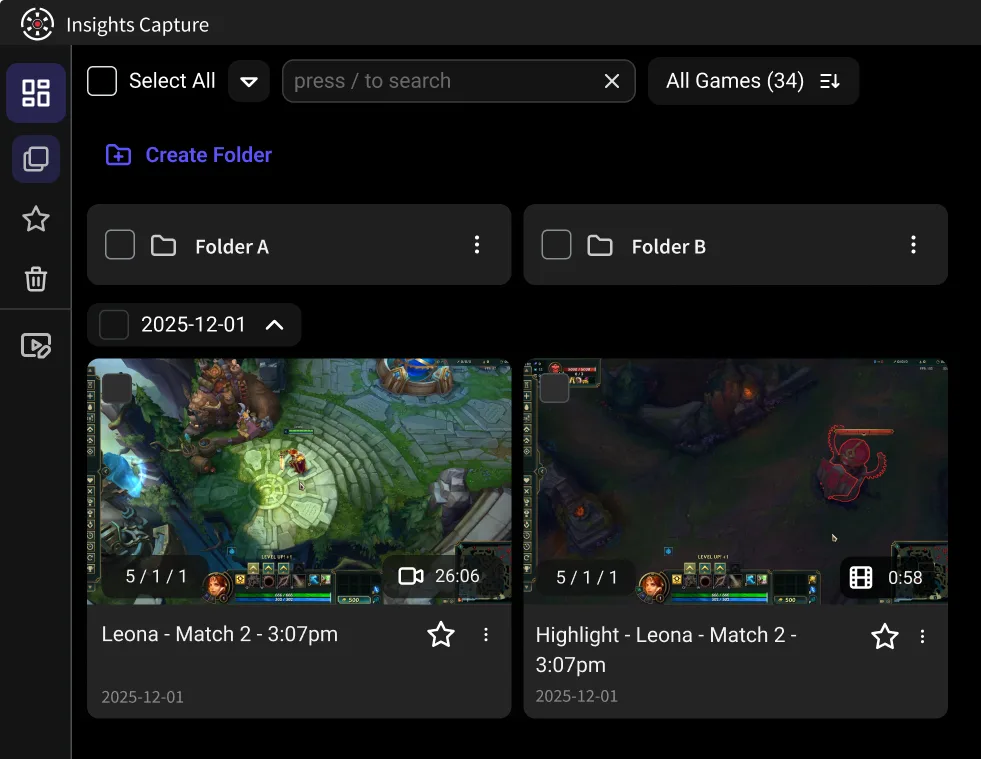
- Choose Insights Capture if you want every match recorded locally the moment you play — streamed or not — with kills and wins marked on a timeline, one click clipping, and a team review workspace.
- The deepest difference: Eklipse only sees what was streamed or uploaded. Insights Capture sees every game you play, because it records at the source.
What Eklipse Does Well
- AI highlight detection on finished streams. Connect your Twitch, YouTube or Kick account, and after one stream ends the AI scans the full stream for kills, funny moments and chat or audio spikes, then serves up highlight clips automatically.
- Vertical convert-and-caption. Its editor reframes 16:9 gameplay into 9:16 aspect ratios with facecam layouts, auto captions and templates — genuinely convenient for YouTube Shorts and Instagram Reels.
- Game specific AI for popular titles, with generic audio spikes detection as the fallback for everything else.
- A free plan to start, with limits — processing caps, watermarks and premium features vary by tier, so check their current pricing.
For a streamer whose only goal is turning last night's broadcast into social media content, Eklipse earns its popularity.
Why Streamers and Players Look for an Eklipse Alternative
- It needs a stream or an upload. No broadcast, no gaming highlights. Ranked grinders, scrim players and anyone who doesn't stream have nothing for the AI to scan — and uploading several hours of VOD for processing is its own chore.
- AI accuracy varies by game. Highlight detection is strongest in big FPS and battle royale titles; in less-supported games it leans on audio spikes, which miss quiet moments and flag loud nothing.
- Cloud waits and caps. Processing happens on Eklipse's servers — you wait for the queue, and free tier limits decide how much of your full stream gets scanned.
- The moment is already gone. Post-stream AI can only find what the broadcast captured. Play offline for a night and that ace never existed.
- No review workflow. Eklipse makes content, not improvement — there's no way to study a full match or leave feedback with a team.
Insights Capture vs Eklipse: Feature by Feature
Where the work happens. Eklipse: in the cloud, after the stream ends. Insights Capture: on your PC, during the game, with GPU-accelerated recording that doesn't dent your FPS.
What gets captured. Eklipse: whatever was streamed or uploaded. Insights Capture: every match, in full, automatically — across 10,000+ games.
Highlight detection. Eklipse: AI scan of the finished VOD. Insights Capture: game specific event detection running live, pinned to a timeline — kills, wins, key moments — ready the second the match ends, with the full recording around them so you can clip the setup, not just the payoff.
Editing and output. Eklipse wins on vertical templates and auto captions for social media channels. Insights Capture covers trim, merge and instant share links (Discord, YouTube, socials) — and its clips are full-quality local files, not re-compressed stream footage.
Review. Insights.gg's VOD review workspace — timestamped comments, drawing tools, merged team POVs — has no Eklipse equivalent at all. Esports teams use it as their standard film room.
Price. Insights Capture is free with no watermark. Eklipse has a free tier with limits and paid plans for the full feature set.
Can You Use Eklipse and Insights Capture Together?
Yes — and for a streaming creator it's the strongest setup. Run Insights Capture locally as the always-on recorder (full-quality capture of everything, streamed or not), and use Eklipse — or a similar vertical clip tool — to convert chosen moments into captioned Shorts. Your source footage stays pristine, no off-stream session is ever lost, and the AI highlights pipeline still feeds your social media accounts.
{{button}}
Other Alternatives Worth Knowing
If you landed here comparing clip tools broadly: Insights vs Medal and Insights vs Outplayed cover the auto-clipping desktop apps, Insights vs OBS covers the manual power option, Insights vs Xbox Game Bar covers the built-in Windows recorder, and the full field is ranked in our 10 best game clipping software guide.
More Eklipse Alternatives by Use Case
- StreamLadder edits clips for TikTok and Instagram Reels, schedules posts from its dashboard and offers free basic editing without a watermark.
- WayinVideo generates highlight clips from a VOD and lets you search for specific moments by keyword.
- Magnifi automates highlight generation, adds captions to every clip and publishes to social media.
- Insights Capture skips the stream entirely: it records every match on your PC, detects events like kills automatically, and gives coaches and teams annotation tools for VOD review.
FAQs: Eklipse Alternatives
1. What is Eklipse used for?
Turning finished stream VODs into short highlight clips — AI finds the best moments, templates convert them into vertical, captioned social media posts in one click.
2. Is Eklipse GG worth it?
For active streamers producing Shorts and Reels from broadcasts, yes — that workflow is its sweet spot. For capturing gameplay itself, a desktop recorder is the better foundation.
3. Is there a free AI clipping tool?
Both tools discussed here have free tiers. Insights Capture's free plan records and auto-marks gaming highlights with no watermark; Eklipse's free plan carries processing limits.
4. What's the best AI for clipping gameplay?
For live, game specific highlight detection: Insights Capture. For post-stream VOD scanning with social templates: Eklipse. They solve different halves of the same problem.
5. Does Eklipse work without streaming?
You can upload recorded videos manually, but the product is built around connected Twitch, YouTube and Kick accounts — without a stream or upload there's nothing for it to process.
6. How does AI highlight detection work?
Two ways: live game-event detection (Insights Capture reads kills, wins and objectives as they happen) and post-hoc VOD analysis (Eklipse scans finished footage for events, chat activity and audio spikes). Live detection catches everything; post-hoc detection only sees what was broadcast.
Final Thoughts
Eklipse edits the game you showed the internet. Insights Capture remembers every game you played. If your gaming highlights only need to exist as TikToks, the cloud AI serves you well — but if you want the plays themselves, captured at the source, marked as they happen and reviewable with your team, download Insights Capture free and let the recorder run. Contact us with questions.